
KeePass
Password Safe
 KeePass Plugins and Extensions
Information about the plugin framework (installing plugins, security, ...) can be found on the help pages 'KeePass 1.x Plugins' and 'KeePass 2.x Plugins'.
|
Backup Another Backup Plugin  Creates backups of databases. DB_Backup Creates backups of databases. DataBaseBackup  Creates backups of databases. KPSimpleBackup Creates backups of databases. SimpleDatabaseBackup Creates backups of databases. I/O & Synchronization IOProtocolExt Adds support for SCP, SFTP and FTPS. SftpSync Adds support for SFTP and SCP. KeeAnywhere Adds support for online storage providers. ProtonDriveSync Adds support for ProtonDrive. KeePassSync Synchronize using online storage providers. KPGoogleSync Synchronize using Google Drive. KeePassOneDriveSync Synchronize using OneDrive. KeePassMasterSlaveSync Synchronize specific entries only. DoubleClueKeePassPlugin Adds multi-factor authentication with DoubleClue. Utilities AdvancedConnect Allows to specify applications for direct connections. Breach/Leak Checkers Check entries against breach lists. ColoredPassword Allows to use different colors for password characters. Custom Icon Dashboarder Statistics and management features for custom icons. EditEntryGroup Allows changing the group of an entry in the entry dialog. ExtendSelection Extends selection to whole word. GlobalSearch Allows searching in all open databases at once. GroupColumn Provides a column showing the group of an entry. iTanMaster Advanced indexed security token management. KeeAutoExec Automatically opens additional databases. KeeLocker Opens BitLocker volumes. KeePassCPEO Adds custom expiry commands. KeeModifiedBy Remembers who has modified an entry. KeePassOpenId Improves support for OpenID providers. KeePassRDP Connects to a server via RDP. KeePassTimestampChanger Allows to change timestamps. KeepLastEntry Remembers the last entry selection. KeeResize Makes dialogs resizable. KeeTheme Changes the appearance of KeePass. KeeUIExt Provides various user interface options. KP2faChecker Displays whether a website supports 2FA. KPEntryTemplates Allows to design new entry types based on templates. KPEnhancedListView Extends the KeePass entry list. KPEnhancedEntryView Extends the KeePass details view. KPFieldsAdminConsole Get statistics and perform bulk operations on fields. KPLauncher Runs KeePass for a specific architecture. LockExtensions Provides more ways to lock the database. MinLock Keeps a minimized KeePass locked. NotesFontSelector Allows to change the notes font. NotesSearch Allows to search in the current entry notes. On-Screen Keyboard Extends KeePass by an on-screen keyboard. On-Screen Keyboard 2 Extends KeePass by an on-screen keyboard. Passphrase Generators Generate passphrases. PasswordChangeReminder Reminds you to change entry passwords. Password Counter Counts and shows entries sharing a password. PatternPass Allows to store and view pattern-based passwords. PEDCalc Allows to define a default lifetime for passwords. Pronounceable Password Generator Generates pronounceable passwords. QualityColumn Provides a 'Password Quality' column. QualityHighlighter Highlights entries based on the password quality. QuickConnectPlugin Connects to Windows/Linux/ESXi hosts. QuickSearch Provides enhanced search capabilities. RDPPlugin Connects to a server via RDP. ReferenceCheck Shows usage of field references and prevents accidental deletion. RmvDup Removes duplicate entries and empty groups. RuleBuilder Simplifies password changes with entry-specific generator rules. SentenceToPassword Turns a memorable sentence into a password. StrengthReport Creates password strength reports. TeamViewerAndAmmyy Conveniently run TeamViewer or Ammyy Admin. Title Display Customize main window title display. TrayRecentFiles Lists recent files in the system tray icon menu. TrueCrypt/VeraCrypt Mount Mounts TrueCrypt/VeraCrypt volumes. TrueCrypt/VeraCrypt AutoDismount Automatically dismounts TrueCrypt/VeraCrypt volumes. Automation & Scripting KPScript KeePass scripting utility. |
Integration & Transfer KeeForm
Opens websites and fills in the login data automatically. Kee Bridge between KeePass and web browsers. ChromeIPass Integrates KeePass and the Google Chrome browser. Passafari Integrates KeePass and the Safari browser. KPFloatingPanel Displays an always on top KeePass floating panel. KeePassHelper Browser extension that stores/retrieves credentials/passkeys in/from KeePass. KeePassPasskey Stores/retrieves passkeys in/from KeePass. KeePassOTP Generates TOTP/HOTP authentication codes. KeeOtp2 Generates TOTP authentication codes. KeeTrayTOTP Generates TOTP authentication codes. TwoFactorQRCodeReader Creates 2FA placeholder parameters from QR codes or OTP URLs. Character Copy Copies specific characters of an entry string. PickCharsPlus Displays specific characters of an entry string. Password Change Assistant Helps to change passwords. QrCodeGenerator Displays passwords as QR codes. KeePassQRCodeView Displays entry fields as QR codes. KeePT Integrates GPG/WinPT functionality. KeePassPinEntry Responds to GPG PinEntry requests. PuttyAgent Adds SSH agent support to KeePass. KeeAgent Adds SSH agent support to KeePass. KeePassHttp Allows KeePass to supply credentials via HTTP. KeePassRest Allows KeePass to supply credentials via REST. KeePassRPC Allows KeePass to supply credentials via RPC. KeePassCommander Allows KeePass to supply credentials via named pipes. KeePassNatMsg Allows KeePass to supply credentials via Native Messaging. Remote Desktop Manager Plugin Allows KeePass to supply credentials to Remote Desktop Manager. KeeSAPLogon Logon to SAP systems. KPSAPLaunch Integration with SAP GUI and NWBC. SalesforcePlugin Logon to Salesforce environments. OneTimeSecretShare Share a password via OneTime Secret. Keebuntu Plugins to better integrate KeePass with Linux systems. Auto-Type AdvancedAutoType Various auto-type enhancements (hot keys, ...). AutoTypeCustomFieldPicker Allows to pick a custom field during auto-type. AutoTypeExclude Provides a placeholder for excluding an entry from auto-type. AutoTypeSearch Provides quick searching as enhancement to global auto-type. AutoTypeShow Shows an entry after auto-typing. AutoTypeSplitter Splits auto-typing into distinct parts. CheckPasswordBox Prevents auto-typing passwords into wrong places. Cycle Input Focus Plus
Browser extension to automate navigation during auto-type. Disambiguator Allows matching by application name and control properties. HotKeyEnabler Allows to add entry-specific system-wide auto-type hot keys. KeePasser
Allows auto-typing into webforms based on URLs (Internet Explorer and Maxthon). KPUInput Auto-Type on Wayland systems. PickCharsDeferred Changes the behavior of {PICKCHARS}.TAN Placeholder Adds support for a placeholder that retrieves a TAN. TCATO Placeholder Allows to enable/disable TCATO per auto-type sequence. ToggleableTCATO Allows to enable/disable TCATO while performing auto-type. URL in Title Bar
Browser extensions that show the current URL in the title bar (for multiple browsers). WebAutoType Allows auto-typing into webforms based on URLs (multiple browsers). Cryptography & Key Providers CertKeyProvider Advanced certificate-based key provider. Multi Cert Key Provider RSA certificate-based key provider. RSA Cert Key Provider Simple RSA certificate-based key provider. KeyManager Certificate-based key provider with GUI. Smart Certificate Key Provider Certificate-based key provider with smart card support. OtpKeyProv Key provider based on one-time passwords. KeeChallenge Key provider based on challenge-response. Key Xchanger A bluetooth key provider plugin. KeePassQuickUnlock Unlocks databases quickly. LockAssist Unlocks databases quickly. KeePassWinHello Unlocks databases quickly using Windows Hello (fingerprint, face, ...). WinHelloUnlock Manages database access credentials using Windows Hello (fingerprint, face, ...). KeePassProtectedKeyStore Creates and uses protected key stores. WinKee Manages database access credentials. KeePassAutoUnlock Opens a database when starting KeePass. KeePassRFID Key provider using RFID/NFC smart cards. KeePerso Key provider using Personalausweis eID. KeePass2Trezor Key provider using Trezor. LoginCard Key Provider Key provider using RFID LoginCard (OWOK light). Token Engine Key Provider Key provider using Token Engine. KeePassKeyServer Key provider that retrieves a key from a key server. Twofish Cipher Adds the Twofish encryption algorithm. Serpent Cipher Adds the Serpent encryption algorithm. Salsa Cipher Adds the Salsa20 encryption algorithm. GostPlugin Adds the GOST R 34.12-2015 encryption algorithm. MultiCipher Encrypts databases using two algorithms. |
Import 1P2KeePass Imports 1Password 1PIF files. AnyPassword Import Imports CSV files exported by 'AnyPassword'. CardFileKPPlugin Imports CRD files created by 'Cardfile'. CodeWallet 3 Import Imports TXT files exported by 'CodeWallet 3'. CodeWallet 6 Konverter Converts TXT files exported by 'CodeWallet 6' to importable CSV files. eWallet Import Imports TXT files exported by 'eWallet'. eWallet Data Liberator Export data from 'eWallet' and import it into KeePass. eWallet2KeePass Migrate 'eWallet' data to KeePass. KeePassBrowserImporter Imports credentials from various browsers. KeePassFirefoxImporter
Imports passwords from Firefox. MSDN/TechNet Key Importer Imports MSDN/TechNet key files. OnePIF Imports 1Password 1PIF files. OneVault Imports 1Password OPVault files. Oubliette Import Imports Oubliette password database files. PasscommImport Imports Password Commander CSV files. Password Minder Import Imports Password Minder data. PINs Import Imports text files exported by 'PINs'. PwSafeDBImport Directly import Password Safe database files. SafeInCloudImp Imports SafeInCloud XML files. SpmImport Imports Steganos Password Manager files. VariousImport Imports several different file formats. Vault3Importer Imports Vault3 XML files. VaultSyncPlugin Imports HashiCorp Vault data. XML Import Imports XML files exported by KeePass 1.x. ZSafe Import Imports text files exported by 'ZSafe'. Convert to 1.x CSV
Utilities to convert files to KeePass 1.x CSV files. Convert to 1.x XML
Utilities to convert files to KeePass 1.x XML files. Convert to 2.x XML or KDBX Utilities to convert files to KeePass 2.x XML or KDBX files. Favicon Downloader Download and store website favicons. Yet Another Favicon Downloader Download and store website favicons. KeePassFaviconExtractor Download and store website favicons. ExeIconPicker Imports icons from Windows executables. Export KeePassNewKeyExport Export data with a new master key. PartialKeePassDatabaseExport Export tagged entries. KeePassSubsetExport Export tagged entries. KeeOldFormatExport Export to old KeePass file formats. KdbxLite Creates lite database files. SecExchange Send entries via Secure Exchanges. Seclave Plugin Export to Seclave password manager device. SimpleSelectionExport Export to flat text files. TheVaultExport Export to The Vault CSV files. KeePass to Keyring
Export KeePass data to Keyring files. KeePassIPhone Convert KeePass 1.x files to iPhone bookmarklets. Import & Export Convert to CSV Utilities to convert files to CSV files. KeePassPfpConverter Imports/exports Pain-free Passwords JSON files. KeeToReady Imports/exports records from/to ReadySignOn. MSWifiPlugin Exchange wireless connection information. Resources Application Icons
Additional application icons. Client Icons Additional client icons. For Developers Sample Plugins
Show developers how plugins can perform basic operations. |
Icons:
= the plugin is available for KeePass 1.x.
= the plugin is available for KeePass 2.x.| Another Backup Plugin
|
|---|
Author: Bill Rubin. Language:
 Automatically backs up the password database. Comprehensive documentation available with plugin and at the ABP project website, which also has ABP forums, version history, and more. Download plugin: [v1.12 for KeePass 1.17 and higher] Download source code: [v1.12 for KeePass 1.17 and higher] |
| 1P2KeePass
|
|---|
|
Author: Dmitry Wolf. Language:
This plugin can import 1Password 1PIF files. [Website] |
| Note: KeePass 2.x has a built-in import module for 1Password 1PUX files. |
| Similar plugins: OnePIF, OneVault. |
| OnePIF
|
|---|
|
Author: Juan Porta. Language:
This plugin can import 1Password 1PIF files. [Website] |
| Note: KeePass 2.x has a built-in import module for 1Password 1PUX files. |
| Similar plugins: 1P2KeePass, OneVault. |
| OneVault
|
|---|
|
Author: Juan Porta. Language:
This plugin can import 1Password OPVault files. [Website] |
| Note: KeePass 2.x has a built-in import module for 1Password 1PUX files. |
| Similar plugins: 1P2KeePass, OnePIF. |
| AnyPassword Import
|
|---|
|
Author: Dominik Reichl. Language:
This plugin can import CSV files that were exported by AnyPassword. The AnyPassword Import plugin is discontinued. Its functionality is integrated into the VariousImport plugin for KeePass 1.x. KeePass 2.x has a built-in import module for AnyPassword files, i.e. no plugin is required. |
| DataBaseReorder
|
|---|
|
Author: Francis Noël. Language:
This plugin adds a command to reorder all groups alphabetically. Download plugin: [2.09 and higher] Download source code: [2.08 and higher] |
| Note: KeePass 2.15 and higher has group reordering commands built-in. |
| DB_Backup
|
|---|
Author: Matyas Bene. Languages:


 Creates backups of modified databases. Features: » Accepts command line parameters. » Resolves KeePass environment variables like %USERNAME%. » Ability to select the number of older backups to keep (i.e. housekeeping for the average people). » Ability to start an arbitrary program for each backed up file. Green light for housekeeping scripts. Function for experts. Latest changes: v1.6.0.1: + Fixed incorrect behaviour with only one destination. + Fixed Czech language file. v1.6.0.2: + Fixed crash if automatic backup on open was enabled with no DB autoloaded. v1.6.0.4: + Added Swedish language kindly submitted by Mikael. Download plugin: [v1.6.0.4 for KeePass 1.15 and higher] Download source code: [v1.6.0.4 for KeePass 1.15 and higher] |
| DataBaseBackup
|
|---|
|
Author: Francis Noël. Language:
Creates backups of modified databases. Download plugin: [v2.0.8.6 for KeePass 2.27 and higher] Download source code: [v2.0.8.6 for KeePass 2.27 and higher] |
| Note: DataBaseBackup does not use KeePass' I/O infrastructure, therefore the plugin is incompatible with most other plugins that are providing support for more protocols (like IOProtocolExt). |
| Similar plugins: KPSimpleBackup, SimpleDatabaseBackup. |
| KPSimpleBackup
|
|---|
|
Author: Marvin Weber. Language:
This plugin saves a backup of your database to a backup location and keeps a specific amount of the newest backups (that you can define) every time you save your database or trigger the backup manually. [Website] |
| Similar plugins: DataBaseBackup, SimpleDatabaseBackup. |
| SimpleDatabaseBackup
|
|---|
|
Author: Joern Koerner. Language:
This plugin creates a backup every time a database is saved. The backups are placed in the database folders. [Website] |
| Similar plugins: DataBaseBackup, KPSimpleBackup. |
| CardFileKPPlugin
|
|---|
|
Author: John Oliver. Language:
This plugin can import CRD files that were created by Cardfile. [Website] |
| CodeWallet 3 Import
|
|---|
|
Author: Sebastian Baumhekel. Language:
This plugin can import TXT files that were exported by CodeWallet 3. Note that this importer is specifically for CodeWallet 3 files. KeePass 2.x already includes an importer for CodeWallet 6 files. Download plugin: [2.10] [2.09] Download source code: [2.09 and higher] |
| CodeWallet 6 Konverter
|
|---|
|
Authors: Mario Linhart (and Ria von der Wartburg). Language:
This tool converts a CodeWallet 6 TXT file to a CSV file that can be imported into KeePass using the Generic CSV Importer. Download plugin: [2.1] Download source code: [2.1] |
| Note: KeePass 2.x has a built-in importer for CodeWallet 6 files. However, the Konverter additionally supports groups and field associations. |
| eWallet Import
|
|---|
|
Author: Michael Lee Simons. Language:
This plugin can import TXT files that were exported by eWallet. Download plugin: [v1.15 for KeePass 1.15 and higher] Download source code: [v1.15 for KeePass 1.15 and higher] |
| eWallet Data Liberator
|
|---|
|
Author: Alex. Language:
Export data from eWallet to an XML file, which can then be imported into KeePass. Please read the Readme.txt file included in the download for instructions how to install the exporter and the KeePass plugin that can import the exported XML file. Download plugin (including source code): [v0.15 for KeePass 2.23 and higher] |
| eWallet2KeePass
|
|---|
|
Author: Thomas Moore. Language:
Convert an export file created by eWallet to a KeePass XML (2.x) file. [Website] |
| KeeAnywhere
|
|---|
|
Author: Daniel Bölts. Language:
KeeAnywhere is a KeePass plugin that provides access to cloud storage providers (cloud drives) like Amazon AWS S3, Box, Dropbox, Google Drive, HiDrive, hubiC or OneDrive. The main goal is to offer a simple UI while integrating deeply into KeePass. This covers all kind of users: novices, experienced and power users. [Website] |
| Note: KeePass 2.x already has built-in support for local files and files accessible via standard protocols (FTP, HTTP, HTTPS, WebDAV, ...), see the help pages 'Loading/Saving From/To URL' and 'Synchronization' for details. The KeeAnywhere plugin is only required when using online storage providers that are not accessible via standard protocols. |
| ProtonDriveSync
|
|---|
|
Author: David Haven. Language:
This plugin adds support for directly accessing database files stored on ProtonDrive. [Website] |
| KeePassSync
|
|---|
|
Authors: Mitch Capper,
Shawn Casey. Language:
KeePassSync is a KeePass plugin that synchronizes your database using FTP/SFTP or various S3-compatible online storage providers (including Amazon S3, Backblaze B2, Cloudflare R2, Google Cloud Services, Alibaba Cloud, Digital Ocean, Synology, Rclone, and more). This allows two or more computers to easily keep their data in sync. [Website] |
| Note: KeePass 2.x already has built-in support for local files and files accessible via standard protocols (FTP, HTTP, HTTPS, WebDAV, ...), see the help pages 'Loading/Saving From/To URL' and 'Synchronization' for details. The KeePassSync plugin is only required when using online storage providers that are not accessible via standard protocols. |
| KPGoogleSync
|
|---|
|
Author: Danyal. Language:
Synchronize KeePass database with Google Drive using Google API. Features include: manual sync from 'Tools' menu, enable/disable sync on save, only sync if local database is newer than remote database in Google Drive. [Website] Fork by WalterPG: [Website] |
| KeePassOneDriveSync
|
|---|
|
Author: Koen Zomers. Language:
This plugin allows synchronizing multiple local databases with multiple databases stored in OneDrive. [Website] |
| KeePassMasterSlaveSync
|
|---|
|
Author: Angelelz. Language:
This plugin allows synchronizing specific entries only. The entries to be synchronized can be defined by parent group names and/or by tags. [Website] |
| DoubleClueKeePassPlugin
|
|---|
|
Author: DoubleClue. Languages:
This plugin stores and retrieves KeePass database files in/from DoubleClue CloudSafe, a cloud protecting data with multi-factor authentication (MFA). [Website] [Manual] [Discussion] |
| KPScript
|
|---|
|
Author: Dominik Reichl. Language:
This utility allows scripting KeePass. For details, see the KeePass Scripting Documentation. Download plugin: [2.61.1] Download source code: [2.61.1] |
| On-Screen Keyboard
|
|---|
|
Authors: Niki Hammler, Dominik Reichl. Language:
When opening a database, this plugin automatically shows an on-screen keyboard for entering the master password. Download plugin: [v2.1 for KeePass 1.19 and higher] Download source code: [v2.1 for KeePass 1.19 and higher] |
| On-Screen Keyboard 2
|
|---|
|
Author: Dominik Reichl. Language:
When opening a database, this plugin automatically shows an on-screen keyboard for entering the master password. This plugin runs on Windows 2000 and higher. Unix-like systems are not supported. Download plugin: [v1.3 for KeePass 2.54 and higher] Download source code: [v1.3 for KeePass 2.54 and higher] |
| Oubliette Import
|
|---|
|
Author: Sebastian Schuberth. Language:
This plugin can import Oubliette password database files. Download plugin: [v1.15-r02 for KeePass 1.15 and higher] Download source code: [v1.15-r02 for KeePass 1.15 and higher] |
| PINs Import
|
|---|
|
Author: Dominik Reichl. Language:
This plugin can import text files that were exported by the 'PINs' password manager. For detailed instructions on how to migrate (i.e. how you have to export your data from PINs and how to import it into KeePass), see the menu 'PINs 4.50 Import Plugin' → 'Help', after you have installed the plugin. The PINs Import plugin is discontinued. Its functionality is integrated into the VariousImport plugin for KeePass 1.x. KeePass 2.x has a built-in import module for PINs files, i.e. no plugin is required. |
| PasscommImport
|
|---|
|
Author: CEPOCTb. Language:
This plugin adds support for importing Password Commander CSV files. [Website] |
| Password Minder Import
|
|---|
|
Author: Matt Young. Language:
This plugin imports Password Minder data. [Website] |
| PwSafeDBImport
|
|---|
|
Author: Taco Plantinga. Language:
This plugin can directly import Password Safe database files (i.e. without exporting any data to an unencrypted format). Supported Password Safe database file versions are 1, 2 and 3. The plugin imports titles, user names, passwords and notes from all versions. From 2 and 3, also groups are imported. From 3, additionally URLs, auto-type definitions, creation / last access / last modification times are imported. Among other things, auto-type definitions are automatically converted to KeePass' syntax, and entry icons are guessed based on the entry's title. Download plugin: [1.05 to 1.09] Download source code: [1.05 to 1.09] |
| SafeInCloudImp
|
|---|
|
Author: Alex Zavadsky. Language:
This plugin adds an import module for XML files created by SafeInCloud. [Website] |
| SpmImport
|
|---|
|
Author: Dominik Reichl. Language:
This plugin adds an import module for files created by Steganos Password Manager 16. Download plugin: [v1.2 for KeePass 2.29 and higher] Download source code: [v1.2 for KeePass 2.29 and higher] |
| Note: The SpmImport plugin is discontinued. KeePass has a built-in import module for Steganos Password Manager CSV files (exported by version 20.0.7 or higher), i.e. no plugin is required. |
| KeeResize
|
|---|
|
Author: Dominik Reichl. Language:
The KeeResize plugin makes several KeePass 2.x dialogs resizable. [Website] |
| KeeTheme
|
|---|
|
Author: Krzysztof Łaputa. Language:
Changes the appearance of KeePass and allows you to create your own custom themes. [Website] |
| Note: KeePass supports all system themes (including dark ones) without a plugin. The KeeTheme plugin is intended for changing KeePass' appearance independent of the active system theme. |
| KeeUIExt
|
|---|
|
Author: Dominik Reichl. Language:
This plugin provides various user interface options:
Download source code: [v1.6 for KeePass 2.61.1 and higher] |
| RmvDup
|
|---|
|
Author: Dominik Reichl. Language:
This plugin removes duplicate entries from the currently opened database (use the new menu command: 'Tools' → 'Remove Duplicate Entries'). Entries are considered to be equal when the following fields are equal: title, user name, password, URL, notes. The following fields are ignored, i.e. they may differ and entries are still considered to be equal: UUID, parent group, icon ID, times (creation, last modification, expiry, ...), attachment. Entries in the 'Backup' group are ignored and will not be removed! Additionally, the plugin can remove empty groups (menu command 'Tools' → 'Remove Empty Groups'). Download plugin: [v1.2 for KeePass 1.15 and higher] Download source code: [v1.2 for KeePass 1.15 and higher] |
| Note: KeePass ≥ 2.16 has built-in commands to delete duplicate entries, empty groups and unused custom icons, i.e. no plugin is required. |
| XML Import
|
|---|
|
Author: Dominik Reichl. Language:
This plugin can import XML files that were exported by KeePass 1.x. In contrast to the other formats (CSV, TXT, ...), XML files store all information (group, entry times, icon index, attachments, ...), and therefore lossless data import/export is possible using this format. KeePass has a built-in export module for XML files, and this plugin can re-import such files. The XML Import plugin is discontinued. Its functionality is integrated into the VariousImport plugin for KeePass 1.x. KeePass 2.x has a built-in import module for XML files, i.e. no plugin is required. |
| VariousImport
|
|---|
|
Author: Dominik Reichl. Language:
This plugin adds support for importing files in the following formats:
Download source code: [v1.2 for KeePass 1.15 and higher] |
| Vault3Importer
|
|---|
|
Author: Alex Vallat. Language:
This plugin adds support for importing Vault3 XML files. [Website] |
| VaultSync
|
|---|
|
Author: Orange Applications for Business. Language:
This plugin adds support for importing HashiCorp Vault data. [Website] |
| ZSafe Import
|
|---|
|
Author: Ivan Bagrintsev. Language:
This plugin can import text files that were exported by ZSafe (Zaurus Password Manager). Download plugin: [1.05] [1.04] Download source code: [1.05] [1.04] |
| KeeForm - Form Filler Utilities
|
|---|
|
Author: dave_keepass. Language:
KeeForm is designed to open and scan a web site for input fields and fill them accordingly with a user name and password. Please note, this is done without any "auto-typing", therefore it is very safe to use: you don't need to be worried that your data could be accidentally typed into a different window. KeeForm comes with an easy-to-use installer. KeeForm works with Mozilla Firefox, Google Chrome and Microsoft Edge. [Website] |
| Kee
|
|---|
|
Author: Chris Tomlinson. Language:
Kee adds free, secure and easy to use password management features to your web browser which save you time and keep your private data more secure. Kee connects your web browser to KeePass. It requires KeePassRPC. [Website] |
| ChromeIPass
|
|---|
|
Authors: Alan Płócieniak, Perry Nguyen. Language:
This extension connects your web browser (Google Chrome) to your KeePass database (via the KeePassHttp plugin), enabling seamless, secure autofill of user names and passwords on websites you visit. [Website] Other: ChromeIPass/PassIFox: original by Perry Nguyen. |
| Passafari
|
|---|
|
Author: Michael Nowak. Language:
Extension allowing Safari to form-fill passwords stored in KeePass. [Website] |
| URL in Title Bar
|
|---|
|
The following browser extensions add the current URL to the browser's
window title. This allows to distinguish websites even when they have
generic page titles. By enabling the option 'An entry matches if its URL is contained in the target window title' in KeePass 2.x ('Tools' → 'Options' → tab 'Advanced'), auto-type by URL can be realized. Some scripts just append the host/domain; in this case the option 'An entry matches if the host component of its URL is contained in the target window title' should be enabled. For Mozilla Firefox: For Google Chrome: For Opera:
|
| KeePasser
|
|---|
|
Author: Mr. Milk. Language:
This extension allows to execute auto-type based on the current web browser URL instead of the window title. For Internet Explorer: [Download] For Maxthon 2: [Download] The Maxthon 2 package installs automatically. For the Internet Explorer version, there's no installer available yet and the extension needs to be installed manually: You must unzip it to C:\Program Files\KeePass. Then you must double
click on C:\Program Files\KeePass\IE\keepasser.reg. A new button will
then be available within IE. For changing the global hot key you must edit the
C:\Program Files\KeePass\IE\keepasser.ini (currently set to
Ctrl+Alt+A).For users of Windows Vista and higher: the extension requires the Microsoft Visual Basic 5.0 Runtime. |
| KPUInput
|
|---|
|
Author: Dominik Reichl. Language:
This plugin allows auto-type on Linux systems with a Wayland compositor. See 'Auto-Type on Wayland'. |
| WebAutoType
|
|---|
|
Authors: Alex Vallat, CEPOCTb. Language:
This plugin allows to execute auto-type based on the current web browser URL instead of the window title. Various browsers are supported (Internet Explorer, Firefox, Opera, Chrome, ...). Latest version: [Website] Old, initial version: [Website] |
| KPFloatingPanel
|
|---|
|
Authors: Alexander Alexeev, s2,
Mitch Capper. Language:
This KeePass plugin shows an always on top KeePass floating panel. It allows you to use your passwords (auto-type, copy to clipboard) without opening the KeePass window. [Website] |
| KeePassHelper
|
|---|
|
Author: Unixeco. Language:
This browser extension stores/retrieves credentials in/from KeePass, and it adds support for passkeys stored in KeePass. KeePassHttp is required. [Website] [Chrome Extension] [Edge Add-On] [Firefox Add-On] [Opera Add-On] [Bug Reports and Discussions] |
| Similar plugin: KeePassPasskey. |
| KeePassPasskey
|
|---|
|
Author: Uwe Kögel. Language:
This plugin turns KeePass into a native Windows 11 passkey provider. Websites and apps that support passkeys work automatically — no browser extension required. [Website] |
| Similar plugin: KeePassHelper. |
| KeePassFirefoxImporter
|
|---|
|
Author: Tony McCreath. Language:
Allows passwords from Firefox to be imported into KeePass. For KeePass 1.x, a stand-alone converter is available. For KeePass 2.x, there is a plugin that integrates the import functionality directly into KeePass. [Website] |
| KeePassBrowserImporter
|
|---|
|
Author: Janis Estelmann. Language:
This plugin imports credentials from various browsers. [Website] |
| KeePassPfpConverter
|
|---|
|
Author: Adrium. Language:
Adds support for importing and exporting Pain-free Passwords JSON files. [Website] |
| KeeToReady
|
|---|
|
Author: ReadySignOn. Language:
This plugin imports and exports ReadySignOn records. [Website] |
| MSDN/TechNet Key Importer
|
|---|
|
Author: Stacy Vicknair. Language:
Adds support for importing MSDN/TechNet key files. [Article] [Website] |
| KeePass to Keyring
|
|---|
| Keyring is a password manager for Palm OS. For both KeePass 1.x and 2.x, there are applications/extensions to export KeePass data to Keyring files (which can then be used on Palm OS using Keyring). |
| KeePassIPhone
|
|---|
|
Author: Helmut Franz. Language:
Convert KeePass 1.x password databases to iPhone bookmarklets. The plugin exports password entries from your KeePass database (KDB) and encrypts it with the XXTEA algorithm. The export format is HTML. [Website] |
| Note: This plugin is a converter. For a list of KeePass ports for iPhones, see the downloads page. |
| KeePassNewKeyExport
|
|---|
|
Author: Janis Estelmann. Language:
Export data with a new master key. [Website] |
| Note: KeePass 2.47 and higher has a built-in option 'Use a different master key' on the 'Options' tab page of the export dialog. |
| PartialKeePassDatabaseExport
|
|---|
|
Author: Heinrich Ulbricht. Language:
Export tagged entries to a new database. The new database can use a different master password. [Website] |
| Similar plugin: KeePassSubsetExport. |
| KeePassSubsetExport
|
|---|
|
Author: lukeIam. Language:
Export tagged entries to a new database. The new database can use a different master password. The group structure is copied to the new database, multiple export jobs are supported, and protection of the new database using a key file is supported. [Website] |
| Similar plugin: PartialKeePassDatabaseExport. |
| Password Counter
|
|---|
|
Author: Jareth Lomson. Language:
This plugin provides a button in the entry dialog with the number of entries that use the password of the open entry, too. It is possible to get the complete list of entries that use the reference password (by clicking the button and choosing the menu item for this). [Website] |
| Passphrase Generators
|
|---|
The following plugins add password generator algorithms that
create passphrases.
|
| PasswordChangeReminder
|
|---|
|
Author: tiuub. Language:
This plugin periodically reminds you to change the password of certain entries after specific time spans. [Website] |
| Similar plugin: PEDCalc. |
| PatternPass
|
|---|
|
Author: Zacchary Dempsey-Plante. Language:
This plugin allows to store and view pattern-based passwords (like the Android lock-screen). [Website] |
| PEDCalc
|
|---|
|
Author: Rookiestyle. Language:
This plugin allows to define a default lifetime for passwords, which will be used to calculate the next expiry date of an entry everytime you change its password. The default lifetime can be defined on both group level and entry level. [Website] |
| Similar plugin: PasswordChangeReminder. |
| PickCharsDeferred
|
|---|
|
Author: Krzysztof Łaputa. Language:
This plugin changes the behavior of the {PICKCHARS}
placeholder. Instead of asking for characters at the very beginning of
auto-type, it will postpone it to the place where it occurs in the
auto-type sequence.
This is useful when a login screen consists of two parts and it is
not known in advance what characters will be needed.[Website] |
| Pronounceable Password Generator
|
|---|
|
Author: Jan Benjamin Engracia. Language:
This plugin adds a custom password generation algorithm, which generates pronounceable passwords. [Website] |
| AdvancedConnect
|
|---|
|
Author: Andreas Albang. Language:
AdvancedConnect allows to specify different applications for direct connections. [Website] |
| QuickConnectPlugin
|
|---|
|
Author: Cristian Stoica. Language:
QuickConnectPlugin allows you to connect to Windows/Linux/ESXi hosts (via Remote Desktop, vSphere Client, PuTTY, ...). [Website] |
| QuickSearch
|
|---|
|
Authors: CennoxX (Georgy Grigoryev, Alex Vallat, Gordon Venem). Language:
QuickSearch is a plugin providing enhanced search capabilities. It can be used as a replacement for the built-in QuickFind toolbar control. Features include:
[Website] Old version (2): [Website] Old version (1): [Website] |
| QualityColumn
|
|---|
|
Author: Dominik Reichl. Language:
Adds support for a 'Password Quality' column in the main entry list. Download plugin: [v1.3 for KeePass 2.48 and higher] Download source code: [v1.3 for KeePass 2.48 and higher] |
| Note: KeePass 2.x has a built-in command 'Password Quality' (in the main menu 'Find') for showing a password quality report. |
| QualityHighlighter
|
|---|
|
Author: Scott Richter. Language:
This plugin highlights entries based on the password quality. Highlighting can be turned on/off using a toolbar button. [Website] |
| Note: KeePass 2.x has a built-in command 'Password Quality' (in the main menu 'Find') for showing a password quality report. |
| RuleBuilder
|
|---|
|
Author: Ira Hanson. Language:
This plugin makes it easy to tell KeePass how to generate a password for each entry and streamlines the process of changing passwords. [Website] |
| SentenceToPassword
|
|---|
|
Author: Topaz Bar. Language:
This plugin allows you to enter a memorable sentence and transforms it into a password. [Website] |
| StrengthReport
|
|---|
|
Authors: Peter Torok, Adam Erdelyi. Language:
Create detailed password strength reports (multiple formats like PDF, CSV, ...) for all entries in a KeePass database. Various strength measuring methods are supported (including dictionary-based tests). Reports can be customized (layout, font, size, colors, etc.). [Website] |
| Note: KeePass 2.x has a built-in command 'Password Quality' (in the main menu 'Find') for showing a password quality report. |
| TAN Placeholder
|
|---|
|
Author: Niki Hammler. Language:
This plugin adds support for a placeholder that retrieves a TAN. [Website] |
| TeamViewerAndAmmyy
|
|---|
|
Author: Emil Kmetski. Language:
This plugin allows you to directly run TeamViewer or Ammyy Admin with credentials stored in the KeePass database. [Website] |
| Title Display
|
|---|
 Author: GoGoGadgetScott. Language:
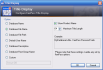
This is a plugin for KeePass that allows the management of the main window title display. [Website] |
| TrayRecentFiles
|
|---|
|
Author: Fábio Beirão. Language:
This plugin lists your recent files directly in the system tray icon menu. [Website] |
| TrueCrypt/VeraCrypt Mount
|
|---|
|
Authors: Patrick Schaller (TrueCrypt),
Frédéric Bourqui (fork for VeraCrypt). Language:
Plugins to mount TrueCrypt/VeraCrypt volumes conveniently.
|
| TrueCrypt/VeraCrypt AutoDismount
|
|---|
|
Author: Alexandre Gravel (TrueCrypt),
Frédéric Bourqui (fork for VeraCrypt). Language:
Plugins to automatically dismount selected or all TrueCrypt/VeraCrypt mounted volumes when all KeePass databases are locked/closed or when KeePass is exited. The plugins dismount TrueCrypt/VeraCrypt volumes after a file is locked/closed but make sure it's the last file that was unlocked/opened.
|
| CertKeyProvider
|
|---|
|
Author: Mark Buchler. Language:
Allows KeePass to use certificates from the Windows certificate store as master key source. This advanced plugin creates a random key, which is used to encrypt the KeePass database. This random key is encrypted using one or more certificates and stored in a key file. [Website] |
| Multi Cert Key Provider
|
|---|
|
Author: Dirk Heitzmann. Language:
This plugin allows KeePass to use a random key, which is encrypted with the RSA certificate of one or more users and is stored in a *.kmx file,
as a master key source.[Website] |
| RSA Cert Key Provider
|
|---|
|
Author: Dirk Heitzmann. Language:
Allows KeePass to use RSA certificates from the Windows certificate store as master key source. From a selected RSA certificate, this simple plugin passes a part from the private key (for cryptographers: the d value) to KeePass as key. The private key must have been marked as 'Exportable' during the import into the certificate store. [Website] |
| KeyManager
|
|---|
|
Author: Stephan Traub. Language:
Based on X.509 certificates, this key provider plugin allows a database to be encrypted for multiple users. It has a graphical user interface for managing certificates and keys. [Website] |
| Smart Certificate Key Provider
|
|---|
|
Author: BodnarSoft. Language:
Encrypt and decrypt your database using an X.509 certificate stored on a smart card or in the Windows Certificate Store. [Website] |
| OtpKeyProv
|
|---|
|
Author: Dominik Reichl. Language:
OtpKeyProv is a key provider based on one-time passwords. After protecting your database using this plugin, you need to generate and enter one-time passwords in order to open your database. All generator tokens that follow the OATH HOTP standard (RFC 4226) are supported. Download plugin: [v2.7 for KeePass 2.54 and higher] Download source code: [v2.7 for KeePass 2.54 and higher] |
| Note: If you instead want KeePass to generate one-time passwords, see the built-in one-time password placeholders and the KeePassOTP, KeeOtp2, KeeTrayTOTP and TwoFactorQRCodeReader plugins. |
| KeeChallenge
|
|---|
|
Authors: Ben Rush, Troy Dhayer. Language:
Allows to protect KeePass databases using YubiKey challenge-response authentication. KeeChallenge-Modern (fork by Troy Dhayer): [Website] KeeChallenge (original by Ben Rush): [Website] |
| Similar plugin: MultiCipher. |
| KeePassOTP
|
|---|
|
Author: Rookiestyle. Language:
This plugin adds advanced support for generating one-time passwords (TOTP and HOTP). Features: auto-type placeholder {KPOTP},
column in the main entry list for displaying and using OTPs,
multiple storage approaches for OTP secrets/states (as part of an entry or
in a separate database), and more.
It is compatible with various apps (Google Authenticator, Microsoft Authenticator,
andOTP, etc.).[Website] |
Note:
KeePass has built-in menu commands and placeholders for generating HOTPs and TOTPs:
{HMACOTP} and
{TIMEOTP}. The plugin adds advanced functionality.If you instead want to protect your KeePass database using one-time passwords (i.e. one-time passwords need to be generated and entered in order to open your database), see the OtpKeyProv plugin. |
| Similar plugins: KeeOtp2, KeeTrayTOTP, TwoFactorQRCodeReader. |
| KeeOtp2
|
|---|
|
Author: tiuub. Language:
KeeOtp2 provides a form to display one-time passwords. The TOTP secret keys are stored in a normalized format, so this plugin is fully compatible with the built-in OTP function (see the note below). It also can be used as a GUI for the built-in OTP function. [Website] The KeeOtp2 plugin originates from the KeeOtp(1) plugin, which is discontinued. |
Note:
KeePass has built-in menu commands and placeholders for generating HOTPs and TOTPs:
{HMACOTP} and
{TIMEOTP}. The plugin adds advanced functionality.If you instead want to protect your KeePass database using one-time passwords (i.e. one-time passwords need to be generated and entered in order to open your database), see the OtpKeyProv plugin. |
| Similar plugins: KeePassOTP, KeeTrayTOTP, TwoFactorQRCodeReader. |
| KeeTrayTOTP
|
|---|
|
Authors: Time Crash, Victor Rezende. Language:
This plugin adds advanced support for generating Time-based One-Time Passwords (TOTPs) from the KeePass tray icon. It also provides a column in the main entry list to display and/or use TOTPs. TOTPs can also be sent by auto-type. The plugin is compatible with Google, Dropbox, Steam, and many more services. [Website] The KeeTrayTOTP plugin originates from the Tray TOTP plugin, which is discontinued. |
Note:
KeePass has built-in menu commands and placeholders for generating HOTPs and TOTPs:
{HMACOTP} and
{TIMEOTP}. The plugin adds advanced functionality.If you instead want to protect your KeePass database using one-time passwords (i.e. one-time passwords need to be generated and entered in order to open your database), see the OtpKeyProv plugin. |
| Similar plugins: KeePassOTP, KeeOtp2, TwoFactorQRCodeReader. |
| TwoFactorQRCodeReader
|
|---|
|
Author: Alex Vallat. Language:
This plugin creates two-factor authentication parameters used by the placeholders {HMACOTP}
and {TIMEOTP} from a QR code (displayed on the screen or
in the clipboard) or from an OTP URL.[Website] |
| Similar plugins: KeePassOTP, KeeOtp2, KeeTrayTOTP. |
| Key Xchanger
|
|---|
|
Author: Siddharth Hegde. Language:
A bluetooth key provider plugin that allows you to save keys on your phone and then send them via bluetooth to unlock your KeePass database. [Website] [Old Website (in Archive.org)] |
| KeePassRFID
|
|---|
|
Author: Leosac. Language:
Encrypt and decrypt your database using an RFID/NFC smart card. [Website] |
| KeePerso
|
|---|
|
Author: buergerservice.org. Language:
Encrypt and decrypt your database using Personalausweis eID (via AusweisApp2). [Website] |
| KeePass2Trezor
|
|---|
|
Author: elebree. Language:
Encrypt and decrypt your database using a Trezor device. [Website] |
| LoginCard Key Provider
|
|---|
|
Author: Daniel Kuczewski. Language:
Encrypt and decrypt your database using an RFID LoginCard (OWOK light). [Website] (in Archive.org) |
| Token Engine Key Provider
|
|---|
|
Author: digitronic. Language:
This plugin provides two-factor authentication to a KeePass database with a token (possession) and the token PIN (knowledge). The token is accessed using the digitronic Token Engine. It is possible to bind additional tokens to a database in order to allow multiple users to access the data. [Website] [Source Code] |
| KeePassKeyServer
|
|---|
|
Author: Patrice LE TEXIER. Language:
This plugin is a key provider that retrieves a key (as part of the database master key) from a key server. The key server supplies the key only if certain conditions are met (computer hardware ID, user name, IP address, etc.). [Website] |
| Twofish Cipher
|
|---|
 Author: GoGoGadgetScott. Language:
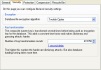
Enables KeePass to encrypt databases using the Twofish algorithm. [Website] |
| Serpent Cipher
|
|---|
|
Author: Timothy Redaelli. Language:
Enables KeePass to encrypt databases using the Serpent algorithm. [Website] |
| Salsa Cipher
|
|---|
|
Author: Scott Bennett. Language:
Enables KeePass to encrypt databases using the Salsa20 algorithm. [Website] |
| GostPlugin
|
|---|
|
Author: Nikolay Kim. Language:
Enables KeePass 2.x to encrypt databases using the GOST R 34.12-2015 algorithm. [Website] |
| MultiCipher
|
|---|
|
Author: Titas Raha. Language:
This plugin allows to use two ciphers for encrypting a database file. Supported ciphers are AES-256, 3DES-192, ChaCha20 and Salsa20. Furthermore, YubiKey challenge-response authentication is supported. [Website] |
| Note: KeePass has built-in support for AES-256 and ChaCha20 as single algorithms. Support for YubiKey challenge-response authentication is alternatively provided by the KeeChallenge plugin. |
| KeePassQuickUnlock
|
|---|
|
Author: Janis Estelmann. Language:
KeePassQuickUnlock is a plugin which lets you re-open your database without your full password. If you want to re-open your database, you can type just a few characters (by default, the first 3 characters of your password) to unlock quickly and easily. If the wrong QuickUnlock key is entered, the database keeps locked and the full password is required to re-open. [Website] |
| Similar plugin: LockAssist. |
| LockAssist
|
|---|
|
Author: Rookiestyle. Language:
LockAssist extends KeePass' lock/unlock mechanism in multiple ways: quick unlock (using a short PIN, optional expiry time), soft lock, all locked databases can be unlocked at once, and more. [Website] |
| Similar plugin: KeePassQuickUnlock. |
| KeePassWinHello
|
|---|
|
Authors: Sasha Sitnikov, Andrey Osipkov. Language:
This plugin is intended for fast authorization to a database (after its first unlock) using Windows Hello. Windows Hello supports fingerprint recognition, facial recognition and more. [Website] |
| Similar plugins: WinHelloUnlock, KeePassProtectedKeyStore. |
| WinHelloUnlock
|
|---|
|
Author: Angelelz. Language:
This plugin allows you to unlock your database conveniently using biometrics via Windows Hello. Windows Hello supports fingerprint recognition, facial recognition and more. [Website] |
| Similar plugins: KeePassWinHello, KeePassProtectedKeyStore. |
| KeePassProtectedKeyStore
|
|---|
|
Author: CSquared167. Language:
This plugin creates and uses protected key stores (using Windows Hello or the Windows Data Protection API (DPAPI)). Features:
|
| Similar plugins: KeePassWinHello, WinHelloUnlock, WinKee, KeePassAutoUnlock. |
| WinKee
|
|---|
|
Author: Theo Beisch. Language:
WinKee helps to securely automate KeePass startup. WinKee separately encrypts, stores and retrieves KeePass database access credentials in the KeePass configuration file ( KeePass.config.xml).Password and key file path will be encrypted based on Windows account credentials (using the Windows Data Protection API (DPAPI)) - so anybody having access to the specific user account and the WinKee database keyfile will be granted KeePass database access. KeePass and WinKee can be configured to automatically open a specified database via command line argument options -keyfile: during a user's Windows session logon or at
any time by e.g. using a batch file.Download plugin: [v2.39.1 for KeePass 2.39.1 and higher] Download source code: [v2.39.1 for KeePass 2.39.1 and higher] |
| Similar plugins: KeePassProtectedKeyStore, KeePassAutoUnlock. |
| KeePassAutoUnlock
|
|---|
|
Author: Jérémy Bourgin. Language:
When starting KeePass, this plugin automatically opens a specific database. The master key for the database is stored in the KeePass configuration file, encrypted based on the Windows user account credentials (using the Windows Data Protection API (DPAPI)). [Website] |
| Similar plugins: KeePassProtectedKeyStore, WinKee. |
| KeePassCPEO
|
|---|
|
Author: Jose Quintero. Language:
This plugin allows adding custom commands in the expiry drop-down menu of the entry dialog. [Website] |
| KeeModifiedBy
|
|---|
|
Author: Dominik Reichl. Language:
This plugin remembers who has modified an entry (operating system user name and machine name). Download plugin: [v1.0 for KeePass 2.55 and higher] Download source code: [v1.0 for KeePass 2.55 and higher] |
| See also: Auditing trigger. |
| KeePassOpenId
|
|---|
|
Author: Alex Greenfield. Language:
This plugin allows you to save an OpenID provider used to register/login to websites instead of a user name and password. You can link the OpenID provider (e.g. Facebook) with an existing KeePass entry to create a reference to the provider user name/password. [Website] |
| KeePassRDP
|
|---|
|
Author: iSnackyCracky. Language:
This plugin allows to conveniently connect to a server via RDP. [Website] |
| EditEntryGroup
|
|---|
|
Author: Alex Vallat. Language:
This plugin allows changing the group that an entry belongs to by using a drop-down selector within the entry editing dialog. [Website] |
| ExtendSelection
|
|---|
|
Author: Georg Winkel. Language:
When double-clicking in the details view of the main window, this plugin extends the selection to the left and to the right until reaching white-space characters. [Website] |
| GlobalSearch
|
|---|
|
Author: Rookiestyle. Languages:
This plugin allows you to use KeePass' built-in search functions ('Find', 'Last Modified Entries', 'Large Entries', 'Password Quality', etc.) for searching in all open databases at once. [Website] |
| GroupColumn
|
|---|
|
Author: Jonathan Nash. Languages:
This plugin provides a column in the main entry list that shows the group an entry is in (and the number of entries in that group). [Website] |
| iTanMaster
|
|---|
|
Author: Theo Beisch. Language:
iTans or 'indexed security tokens' are becoming standard to improve access security in online banking and similar applications. iTanMaster provides easy and fast access to the encrypted storage of such indexed security tokens. iTanMaster supports single, dual (e.g. Interactive Brokers) and triple token systems (e.g. Flatex AG) where the final access TAN is constructed from multiple separately indexed and then concatenated token parts. Download plugin: [v2.28.0.2 for KeePass 2.28 and higher] Download source code: [v2.28.0.2 for KeePass 2.28 and higher] |
| RDPPlugin
|
|---|
|
Author: Mikhail Ermakov. Language:
This plugin allows to conveniently connect to a server via RDP. Download plugin: [v7.0 for KeePass 2.41 and higher] Download source code: [v7.0 for KeePass 2.41 and higher] |
| ReferenceCheck
|
|---|
|
Author: Rookiestyle. Languages:
This plugin shows usage of field references (in the entry dialog, in an entry list column, in an overview dialog, etc.) and prevents accidental deletion of referenced entries which would break them otherwise. [Website] |
| TCATO Placeholder
|
|---|
|
Author: Niki Hammler. Language:
This plugin adds support for a placeholder that allows to enable/disable TCATO, i.e. TCATO can be enabled/disabled per auto-type sequence. [Website] |
| Similar plugin: ToggleableTCATO. |
| ToggleableTCATO
|
|---|
|
Author: Carrie Forle. Language:
This plugin adds support for a placeholder that allows to enable/disable TCATO while performing auto-type (i.e. in the middle of an auto-type sequence). [Website] |
| Similar plugin: TCATO Placeholder. |
| AdvancedAutoType
|
|---|
|
Author: Rookiestyle. Language:
This plugin provides various enhancements for the auto-type feature of KeePass, e.g. support for additional global hot keys to auto-type alternative sequences, additional features for the auto-type entry selection dialog (entry filtering, sortable columns, database name, auto-type certain fields only, ...), and more. [Website] |
| AutoTypeCustomFieldPicker
|
|---|
|
Author: Bernd Bestel. Language:
This plugin provides support for a placeholder {PICKCUSTOMFIELD}.
When auto-typing a sequence containing this placeholder, a window is displayed
that allows to pick a custom string field
(whose value is then inserted at the placeholder's position).[Website] |
Note:
KeePass 2.35 and higher has a built-in placeholder
{PICKFIELD}
that provides the same functionality as the plugin.
|
| AutoTypeExclude
|
|---|
|
Author: Michael Hüpkes. Language:
This plugin provides support for a placeholder to exclude an entry from auto-type based on the target window. [Website] |
| AutoTypeSearch
|
|---|
|
Author: Alex Vallat. Language:
This plugin provides a quick searching capability as an enhancement to the global auto-type system. If a global auto-type is requested, but no matching entry for the active window is found, this plugin will show a quick as-you-type search window which lets you easily pick the entry to auto-type. [Website] |
| AutoTypeShow
|
|---|
|
Author: Alex Vallat. Language:
This plugin provides a {SHOWENTRY} auto-type placeholder.
If you include this placeholder in your auto-type sequence for an entry, then after
the auto-typing is done, the KeePass window will be shown with the entry selected.Furthermore, the plugin has an option to set up a global hot-key to trigger a show-only auto-type (where it will act just like an ordinary auto-type, except it won't actually type anything). [Website] |
| AutoTypeSplitter
|
|---|
|
Author: Krzysztof Łaputa. Language:
This plugin splits auto-typing into distinct parts. It is useful when a login screen consists of multiple parts and it is not known in advance when or what characters will be needed. Also, the plugin can be used as a delay method until the next page of a multi-page login loads and when a particular entry is to be entered in multiple places with varying arrangements/designs of input fields. [Website] |
| Breach/Leak Checkers
|
|---|
The following plugins check entries against breach lists:
|
| CheckPasswordBox
|
|---|
|
Author: Alex Vallat. Language:
This plugin adds a protection against accidentally auto-typing into the wrong place. It allows a check to be performed that the box that is about to be auto-typed into is a password box and not, for example, a user name box, search box, IM chat window, or similar. [Website] |
| Cycle Input Focus Plus
|
|---|
|
Author: Thomas Henlich. Language:
Cycle Input Focus Plus is a browser extension that provides customizable keyboard shortcuts for navigating to user name and password fields on login pages. It was developed to improve auto-type comfort with KeePass, freeing the user of the task of manually selecting the login field before performing auto-type, and also makes the auto-type procedure more robust against changes in the login page structure and layout. [Firefox Add-On] [Chrome Extension] |
| Disambiguator
|
|---|
|
Author: Darin Higgins. Language:
For each auto-type association, this plugin allows to specify the target application (executable file name/path) and control properties (name, class, automation ID, ...) that are required for a match. [Website] |
| ColoredPassword
|
|---|
|
Author: Rookiestyle. Language:
This plugin allows to define different text and background colors for digits and special characters in passwords. [Website] |
| HotKeyEnabler
|
|---|
|
Author: Jarosław Oparka. Language:
For each entry, this plugin allows to define a system-wide hot key that auto-types a specific sequence. [Website] |
| Character Copy
|
|---|
|
Author: Sketching Dev. Language:
Character Copy is a lightweight KeePass plugin that integrates into KeePass' entry menu and allows users to securely copy individual characters from an entry's protected string fields, such as the password field. [Website] |
Note:
In conjunction with auto-type, the built-in
{PICKCHARS}
placeholder is more powerful and convenient.
The Character Copy plugin is useful for users who are not using auto-type
or do not want to customize the auto-type sequence.
|
| Similar plugin: PickCharsPlus. |
| PickCharsPlus
|
|---|
|
Author: Martin Rose. Language:
This plugin allows to display specific characters of an entry string. For phone-based security checks asking for specific characters, the plugin can display phonetics. [Website] |
Note:
In conjunction with auto-type, the built-in
{PICKCHARS}
placeholder is more powerful and convenient.
The PickCharsPlus plugin is useful for users who are not using auto-type
or do not want to customize the auto-type sequence.
|
| Similar plugin: Character Copy. |
| Password Change Assistant
|
|---|
|
Author: Rookiestyle. Language:
This plugin helps you with changing your passwords stored in KeePass. It integrates itself into the existing form for editing entries and provides a standalone form that can be accessed by the entry's context menu in addition. It does not automatically fill in and submit all the various forms for changing a password. [Website] |
| KeePassHttp
|
|---|
|
Authors: Alan Płócieniak, Perry Nguyen. Language:
KeePassHttp provides a secure means of exposing KeePass entries via HTTP for clients to consume. For example, ChromeIPass, KeePassHelper, Dash and NotesIPass are using KeePassHttp. [Website] Others: KeePassHttpX: a port of KeePassHttp by Sergey Sazonov optimized for MacOS. KeePassHttp: original by Perry Nguyen. |
| KeePassRest
|
|---|
|
Author: SmartSoft Ltd. Language:
This plugin for KeePass provides a secure HTTPS RESTful interface for clients to manage entries in KeePass. For example, SmartFTP can then use KeePass as a credentials store. [Website] |
| KeePassRPC
|
|---|
|
Author: Chris Tomlinson. Language:
KeePassRPC enables secure, encrypted and bi-directional communication between KeePass and other applications via RPC. Kee requires KeePassRPC. [Website] [Upgrade Instructions] |
| KeePassCommander
|
|---|
|
Author: Mirco Babin. Language:
The KeePassCommander plugin provides a communication channel between KeePass and other applications via named pipes. There exists a command line tool that uses this for querying data from KeePass. [Website] |
| KeePassNatMsg
|
|---|
|
Author: Andy Brandt. Language:
The KeePassNatMsg plugin provides a communication channel between KeePass and other applications via Native Messaging. [Website] |
| Remote Desktop Manager Plugin
|
|---|
|
Author: Devolutions Inc. Language:
This plugin allows KeePass being used as credential repository for Remote Desktop Manager. [About] [Configuring] |
| KeeSAPLogon
|
|---|
|
Author: Marko Graf. Language:
This plugin allows to conveniently logon to SAP systems. [Website] |
| Note: A less convenient solution without a plugin can be found here: Using KeePass Instead of SAP Logon. |
| Similar plugin: KPSAPLaunch. |
| KPSAPLaunch
|
|---|
|
Author: David S. Language:
This plugin provides an integration with SAP GUI and NetWeaver Business Client (NWBC). [Website] |
| Similar plugin: KeeSAPLogon. |
| SalesforcePlugin
|
|---|
|
Author: Paul Perry. Language:
Login to your Salesforce environments using this KeePass plugin. Instead of auto-type, your credentials will be passed through in a link. [Website] |
| OneTimeSecretShare
|
|---|
|
Author: David S. Language:
This plugin allows to share the password of a KeePass entry as a one-time, self-destructing link via OneTime Secret. [Website] |
| Keebuntu
|
|---|
|
Author: David Lechner. Language:
Various plugins to better integrate KeePass 2.x with Linux systems (tray icon, launcher, ...). [Website] [PPA] |
| Custom Icon Dashboarder
|
|---|
|
Author: Jareth Lomson. Language:
This plugin provides statistics (e.g. numbers and lists of entries and groups that use a specific custom icon) and advanced management features (e.g. download favicon for a URL) for custom icons. [Website] |
| Similar plugins: Favicon Downloader, Yet Another Favicon Downloader, KeePassFaviconExtractor. |
| Favicon Downloader
|
|---|
|
Author: Chris Tomlinson. Language:
This plugin downloads and stores favicons. A favicon is the little icon/logo used to identify many websites, typically displayed in the browser's address bar, bookmark list and on tabs. [Website] |
| Similar plugins: Custom Icon Dashboarder, Yet Another Favicon Downloader, KeePassFaviconExtractor. |
| Yet Another Favicon Downloader
|
|---|
|
Author: Rafael Cossovan. Language:
Yet Another Favicon Downloader (YAFD for short) is a plugin for KeePass 2.x that allows you to quickly download favicons for your password entries. [Website] |
| Similar plugins: Custom Icon Dashboarder, Favicon Downloader, KeePassFaviconExtractor. |
| KeePassFaviconExtractor
|
|---|
|
Author: Zeynel Öztürk. Language:
KeePassFaviconExtractor is a plugin for KeePass 2.x that allows extracting website favicons and setting them as entry icons. Multiple discovery methods are supported. [Website] |
| Similar plugins: Custom Icon Dashboarder, Favicon Downloader, Yet Another Favicon Downloader. |
| ExeIconPicker
|
|---|
|
Author: Eveldee. Language:
ExeIconPicker lets you grab an icon from a Windows executable file (.exe), a library (.dll) or an icon file (.ico) and use it as an entry or group icon. [Website] |
| KeeOldFormatExport
|
|---|
|
Author: Dominik Reichl. Language:
This plugin adds support for exporting data to old KeePass file formats. Supported formats are KeePass KDB (1.23) and KeePass KDBX (2.19). Download plugin: [v1.2 for KeePass 2.42.1 and higher] Download source code: [v1.2 for KeePass 2.42.1 and higher] |
| Note: For opening/importing old files, no plugin is required. KeePass is fully backward compatible. |
| KdbxLite
|
|---|
|
Author: Dominik Reichl. Language:
This plugin creates lite database files. Every time you save a ' *.kdbx' file, the plugin creates a
'*.lite.kdbx' file (in the same directory)
that contains everything except entry attachments.Download plugin: [v1.2 for KeePass 2.54 and higher] Download source code: [v1.2 for KeePass 2.54 and higher] |
| SecExchange
|
|---|
|
Author: Secure Exchanges. Language:
This plugin allows to conveniently send KeePass entries via Secure Exchanges. [Website] |
| Seclave Plugin
|
|---|
|
Author: Seclave AB. Language:
This plugin adds functionality for exporting KeePass entries to a Seclave Password Manager. It supports both export of all entries or a selected group of entries. Seclave Password Manager is a key ring size device for secure and convenient storing of passwords and crypto keys. [Website] [Source Code] |
| SimpleSelectionExport
|
|---|
|
Author: Mark Szymanski. Language:
This plugin allows you to export basic entry information to flat text files (for instance TXT and CSV). It is useful when you want to send a quick overview of an arbitrary set of entries to parties who are not using KeePass. [Website] |
| Note: KeePass has a built-in command for exporting selected entries to certain formats (e.g. CSV): after selecting the entries, click on the menu item 'Entry' → 'Data Exchange' → 'Export Entry'. The plugin provides support for additional formats. |
| TheVaultExport
|
|---|
|
Author: Bruce. Language:
This plugin adds support for exporting KeePass entries to a CSV file readable by The Vault. Download plugin: [v2.0.2 for KeePass 2.34 and higher] Download source code: [v2.0.2 for KeePass 2.34 and higher] |
| MSWifiPlugin
|
|---|
|
Author: Christopher R. Nerz. Language:
This plugin allows to import wireless connection information saved in Windows into KeePass and afterwards to export this information back to Windows. This can be used to back up existing wireless connections or to transfer them from one system to another. [Website] |
| KeeAutoExec
|
|---|
|
Author: Dominik Reichl. Language:
This plugin allows to automatically open additional databases when opening a database. Download plugin: [v2.6 for KeePass 2.52 and higher] Download source code: [v2.6 for KeePass 2.52 and higher] |
| KeeLocker
|
|---|
|
Author: Sylvain Guglielmi. Language:
This plugin opens BitLocker volumes. [Website] |
| KeePassTimestampChanger
|
|---|
|
Author: Janis Estelmann. Language:
This plugin provides a dialog that allows to change the timestamps of an entry. [Website] |
 Warning:
KeePass' synchronization depends on correct timestamps.
When changing timestamps using the plugin, synchronization may not work
as expected anymore (e.g. entries may be overwritten by older copies).
Warning:
KeePass' synchronization depends on correct timestamps.
When changing timestamps using the plugin, synchronization may not work
as expected anymore (e.g. entries may be overwritten by older copies).
|
| KeepLastEntry
|
|---|
|
Author: Artyom Zhurkin. Language:
This plugin remembers and restores the last entry selection when opening a database. [Website] |
| IOProtocolExt
|
|---|
|
Author: Dominik Reichl. Language:
This plugin adds support for loading/saving files from/to servers via SCP, SFTP and FTPS. KeePass can handle FTP by default (using classes of the .NET framework). However, this plugin replaces the FTP handler to use WinSCP instead. So, if you have problems with the .NET FTP classes, installing IOProtocolExt might solve them. Due to its usage of WinSCP, the IOProtocolExt plugin only works on Windows. If you are using Linux, consider other plugins (like SftpSync) instead. Download plugin: [v1.17 for KeePass 2.54 and higher] Download source code: [v1.17 for KeePass 2.54 and higher] |
| SftpSync
|
|---|
|
Author: Vitaly Burkut. Language:
This plugin adds support for loading/saving files from/to servers via SFTP and SCP. [Website] Fork by Shellster (with updated SSH.NET library, configurable connection timeout, etc.): [Website] |
| Note: The IOProtocolExt plugin also adds support for SFTP/SCP and additionally supports FTPS, but it only works on Windows (in contrast to the SftpSync plugin). |
| KP2faChecker
|
|---|
|
Author: tiuub. Language:
This plugin provides a column in the main entry list and a form that display whether a website supports two-factor authentication (2FA). [Website] |
| KPEntryTemplates
|
|---|
 Author: Mitch Capper. Language:
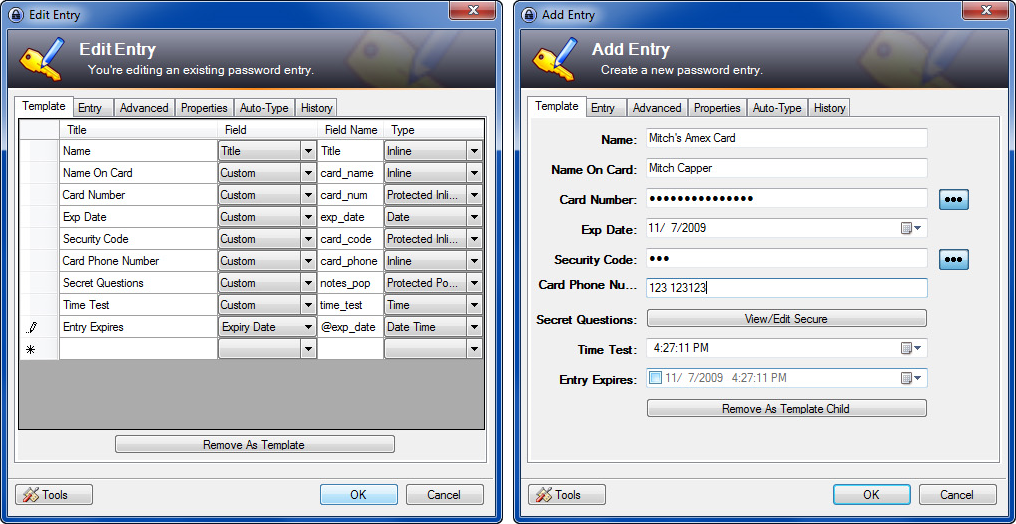
KPEntryTemplates is a plugin that is supposed to make it easier for KeePass to be used for storing additional things than web logins and extend the templating system. The primary interface for the plugin is an extra tab that shows up in the 'Add Entry' form. By default going to the tab on a new entry will present you with one of two buttons, 'Init As Template' or 'Set Template Parent'. 'Init As Template' marks the entry as a template, and shows the GUI builder interface on the tab. Once you have a template set up, you can create entries based on it. [Website] |
| KPEnhancedListView
|
|---|
 Author: Frank Glaser. Language:
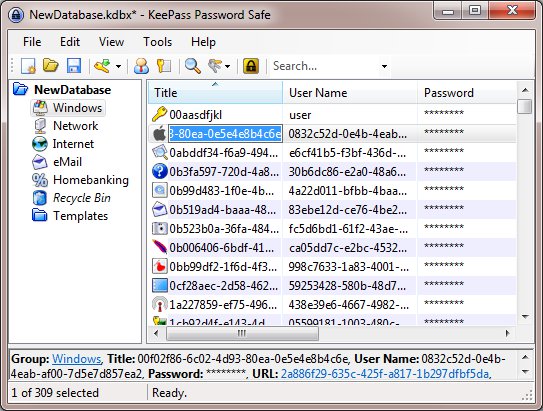
KPEnhancedListView extends the entry list in the KeePass main window. It adds inline editing and the ability to double-click the empty list view area to add a new entry. [Website (at GitHub)] [Website (at Google Code)] |
| KPEnhancedEntryView
|
|---|
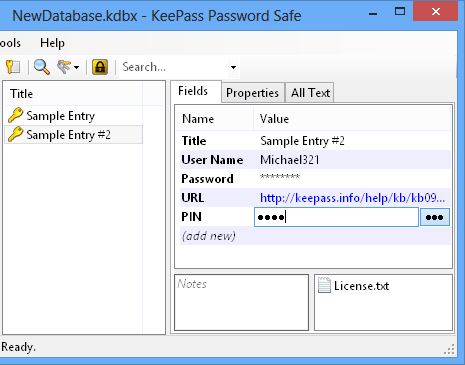 Author: Alex Vallat. Language:
KPEnhancedEntryView extends the details view in the KeePass main window. All fields (standard and custom strings) are shown in a grid view, field values (and names for custom strings) are in-place editable, attachments can be dragged and dropped to and from files in Windows File Explorer, metadata properties are shown on a separate tab, and the original textual details view is still available on another tab. [Website] |
| KPFieldsAdminConsole
|
|---|
|
Author: Jareth Lomson. Language:
KPFieldsAdminConsole is a KeePass plugin to get some statistics and perform bulk operations on fields. [Website] |
| KPLauncher
|
|---|
|
Author: Dominik Reichl. Language:
By default, KeePass runs natively on most operating systems (i.e. without compatibility layer and without emulation). However, there are special situations where it may be necessary to run KeePass for a different architecture (with compatibility layer or with emulation). For example, if you have an ARM64 operating system and want to use an old plugin that is available only for x64, you need to run KeePass as x64 process (with emulation). KPLauncher allows this. KPLauncher can run KeePass as x86 (x86-32), x64 (x86-64) or ARM64 (AArch64) process, provided that the operating system supports it. Download tool: [v1.1 for KeePass 2.61 and higher] Download source code: [v1.1 for KeePass 2.61 and higher] |
| LockExtensions
|
|---|
|
Author: Niki Hammler. Language:
LockExtensions is a plugin for KeePass which gives the user three more ways to lock the database:
Download source code: [v1.2 for KeePass 1.17 and higher] |
| MinLock
|
|---|
|
Author: TLHobbes. Language:
MinLock keeps a minimized KeePass locked (re-locks almost immediately after it becomes unlocked, as long as it is still minimized). This happens to be the case when KeePass is locked and minimized and then its global auto-type feature is used, which can unlock KeePass and leave it unlocked. [Website] |
| NotesFontSelector
|
|---|
|
Author: Rookiestyle. Language:
This plugin allows you to select the font that is used for an entry's notes. [Website] |
| Note: Without this plugin, KeePass uses the default graphical user interface (GUI) font for the notes (which is also used by most other controls). This font can be changed in the operating system settings. For details, see the FAQ item 'How to change the GUI font (size)?'. |
| NotesSearch
|
|---|
|
Author: Gerd Besch. Language:
This plugin allows to search in the notes of the currently selected entry. [Website] |
| QrCodeGenerator
|
|---|
|
Author: Oliver Salzburg. Language:
This plugin can display passwords as QR codes. Download plugin: [v2.0.12 for KeePass 2.20 and higher] Download source code: [v2.0.12 for KeePass 2.20 and higher] |
| KeePassQRCodeView
|
|---|
|
Author: Janis Estelmann. Language:
KeePassQRCodeView is a plugin for KeePass 2.x which shows QR codes for entry fields. These codes can be scanned to copy the encoded data to the scanner (smartphone, ...). [Website] |
| KeePT
|
|---|
|
Author: Niki Hammler. Language:
KeePT allows to access all functions from WinPT/GPG from KeePT's tray menu. Furthermore, the plugin registers WinPT's hot keys and allows to pass the GPG passphrase to WinPT. Information page: [GPG: WinPT + KeePass = KeePT] Download plugin: [v1.2 for KeePass 1.21 and higher] Download source code: [v1.2 for KeePass 1.21 and higher] |
| KeePassPinEntry
|
|---|
|
Author: Dustin H. Language:
This plugin allows KeePass to respond to GPG PinEntry requests for you. [Website] |
| PuttyAgent
|
|---|
|
Author: Niki Hammler. Language:
The PuttyAgent plugin adds SSH agent support to KeePass. It is derived from PuTTY's Pageant. Download plugin: [v3.0 for KeePass 1.27 and higher] Download source code: [v3.0 for KeePass 1.27 and higher] |
| KeeAgent
|
|---|
|
Author: David Lechner. Language:
The KeeAgent plugin adds SSH agent support to KeePass. It emulates Pageant. [Website] |
| Convert to KeePass 1.x CSV
|
|---|
Scripts to convert various files to KeePass 1.x CSV files,
which can then be imported into KeePass 1.x and 2.x.
|
| Convert to CSV
|
|---|
Scripts to convert various files to CSV files,
which can then be imported into KeePass 2.x (e.g. using the built-in
Generic CSV Importer).
|
| Convert to KeePass 1.x XML
|
|---|
Scripts to convert various files to KeePass 1.x XML files,
which can then be imported into KeePass 1.x and 2.x.
|
| Convert to KeePass 2.x XML or KDBX
|
|---|
Scripts to convert various files to KeePass 2.x XML or KDBX files.
|
| Application Icons
|
|---|
Here you can download some additional
application icons. These can
for example be used in shortcuts to the KeePass executable or as
icon for the KDB and KDBX file types.
|


| Client Icons
|
|---|
|
In KeePass 2.x, additional icons can be imported into a database as
group and entry icons. For details, see the
FAQ. The following icons have been designed specifically for being used as group and entry icons. |
| [Developers] Sample Plugins
|
|---|
|
Author: Dominik Reichl. Language:
SamplePlugin (C#). This sample plugin shows how a small KeePass plugin looks like. See the KeePass 2.x Plugin Development page for more information. Download 2.x plugin: [v2.20 for KeePass 2.41 and higher] Download 2.x source code: [v2.20 for KeePass 2.41 and higher] SamplePluginCpp (C++). Download 2.x plugin: [v2.18 for KeePass 2.41 and higher] Download 2.x source code: [v2.18 for KeePass 2.41 and higher] ArcFourCipher. Sample plugin that demonstrates how to create an encryption algorithm plugin (ArcFour): Download 2.x plugin: [v4.0 for KeePass 2.57.1 and higher] Download 2.x source code: [v4.0 for KeePass 2.57.1 and higher] Warning: this cipher is insecure! The plugin is intended only as example for plugin developers, not for end-users! PwGen. Sample plugins that demonstrate how to create a custom password generator algorithm plugin: Download 2.x plugin: [PwGenBaliktad v1.2 for KeePass 2.18 and higher] [PwGen8U v1.0 for KeePass 2.18 and higher] Download 2.x source code: [PwGenBaliktad v1.2 for KeePass 2.18 and higher] [PwGen8U v1.0 for KeePass 2.18 and higher] ColorChange. Sample plugin that enforces that expired entries are drawn with a red background color (in the entry list of the main window). Entries that will expire soon are drawn with an orange background color and a warning icon. Download 2.x plugin: [v1.1 for KeePass 2.38 and higher] Download 2.x source code: [v1.1 for KeePass 2.38 and higher] ColorChangeColumn. Sample plugin that provides a column 'Change Color' (in the entry list of the main window). When double-clicking on a cell of this column, the background color of the entry is changed to a random color. Download 2.x plugin: [v1.0 for KeePass 2.30 and higher] Download 2.x source code: [v1.0 for KeePass 2.30 and higher] See also the QualityColumn plugin. CustomSecureTextBox. Sample plugin that demonstrates how to create a custom secure edit control: Download 2.x plugin: [v1.0 for KeePass 2.39 and higher] Download 2.x source code: [v1.0 for KeePass 2.39 and higher] TestPlugin (C++, KeePass 1.x). See the KeePass 1.x Plugin Development page for more information and libraries (like Plugin Framework for C++ plugin development). Download 1.x plugin: [v1.4 for KeePass 1.15 and higher] Download 1.x source code: [v1.4 for KeePass 1.15 and higher] |
Old versions. See here: Old Plugin Versions.
Integrity. Hashes and OpenPGP signatures of various plugin packages can be found here: Integrity of Plugins and Extensions.
Security. Most of the plugins listed on this page are developed by different, independent authors. The KeePass team cannot check all plugins for bugs and malicious code.
Naming. "KeePass" is the password manager developed by Dominik Reichl. Any software by other developers that is using the name "KeePass" in the software's name without any direct non-numeric/non-special prefix/suffix is abusing the name "KeePass" and we do not recommend such software. For example, "KeePassSync" is ok, but "KeePass Sync" is not.